12 Reasons Roamates Is the Easiest Way to Share a Home (or a Trip)
Splitwise splits the bill. Roamates also runs the house: shared live notes, rotating chore schedules and a chat thread on every expense. It’s free, and here’s how the two compare.
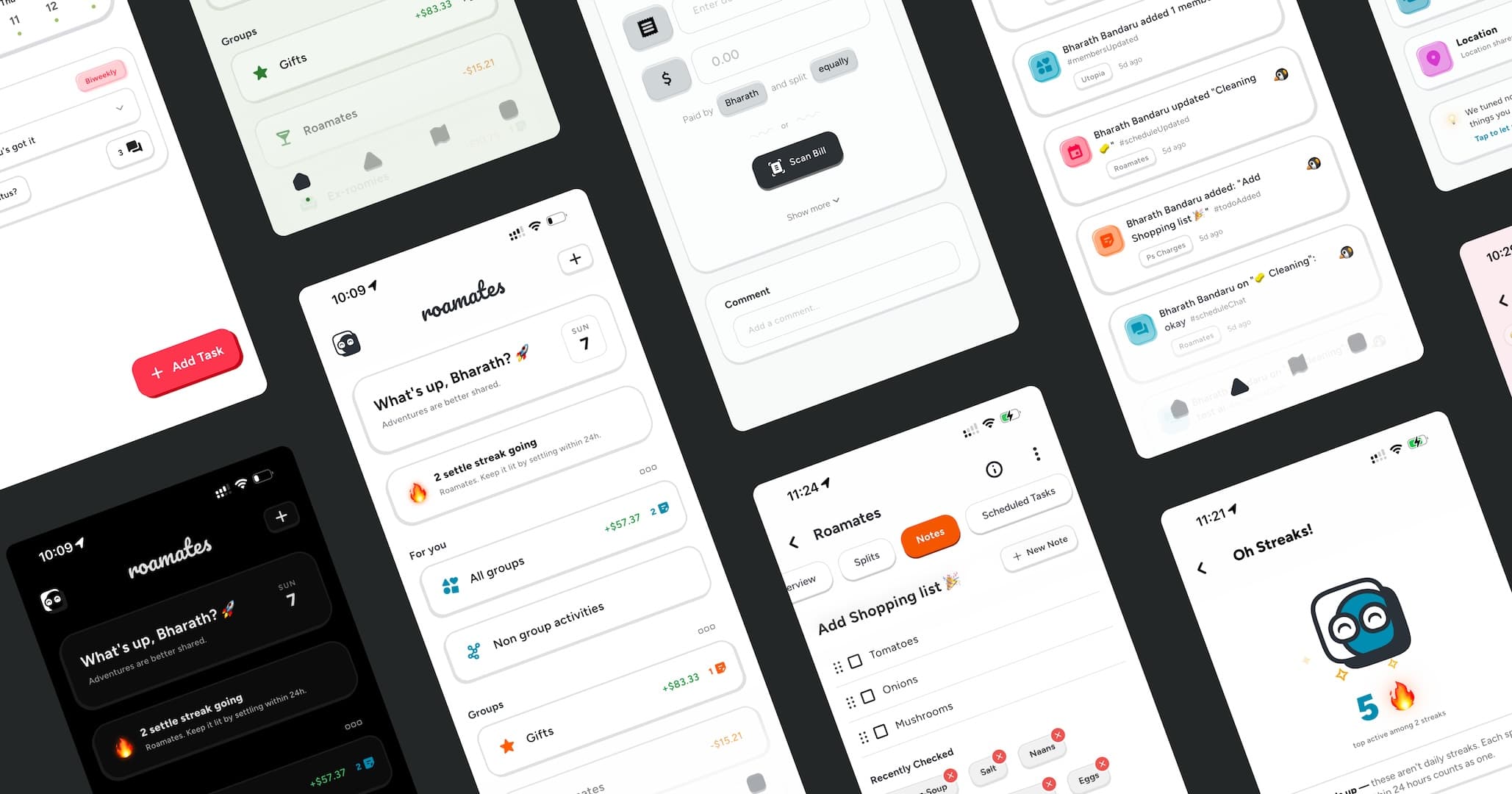
Roamates is free on iPhone and Android.
Key takeaways
- Roamates is a free app for iPhone and Android, made by Ephileo, that combines expense splitting with shared live notes, chore schedules and chat threads for roommates, couples and travel groups.
- Unlike Splitwise, which focuses on money, Roamates also handles the rest of shared living: whose turn it is, what’s on the grocery list, and the conversation about each bill.
- Notes are shared checklists and lists that several people edit at the same time, with live cursors.
- Schedules rotate chores automatically on a weekly, biweekly or monthly cycle, and housemates can swap turns and check in when they’re done.
- Chat threads come with every expense, note and schedule, with emoji reactions and “seen by” markers, so conversations stay attached to what they’re about.
- Receipt scanning and item-by-item splitting are Pro features in Splitwise. In Roamates they’re free, with no ads and no expense limits. Switching takes one CSV import.
Living with other people is mostly great. The friction comes from the small stuff: the electricity bill nobody has split yet, the grocery run three people chipped into, the trash that has quietly become one person’s job. Most households handle it with a group chat, a spreadsheet nobody updates and a lot of goodwill. That works until it doesn’t.
Splitwise fixed part of this: it made splitting the bill easy. But money is only half of sharing a home. Roamates covers the other half too, so the whole group runs the house from one app. Below are the twelve biggest reasons people pick it, a head-to-head with Splitwise, and a frank list of what Roamates doesn’t do yet.
What is Roamates?
Roamates is a free mobile app for roommates, couples and travel groups. It lets a group split shared expenses, see who owes whom, rotate chores on a schedule, keep shared notes and shopping lists, chat about any of it, and share live location. It runs on iPhone and Android, and it is built by Ephileo, an independent app studio.
Every group you create is typed as Home, Trip, Couple or Other, so the same app covers your apartment, your weekend away and the running tab with your partner.
More than a bill splitter: notes, chat and schedules
This is the biggest difference between Roamates and expense-only apps like Splitwise. The three features below are built for the parts of shared living that never show up on a receipt.
Notes
Shared grocery lists, checklists and quick polls that the whole house edits at the same time, with live cursors.
Schedules
Chores rotate automatically, weekly, biweekly or monthly. Swap a turn, check in when it’s done, and everyone can see whose turn it is.
Chat
Every expense, note and schedule has its own chat thread with reactions and “seen by” markers. No more digging through the group chat.
The 12 pros of using Roamates
1. Shared notes and lists, edited together live
Notes in Roamates mix free text, checklists and single-choice options, and several people can edit the same note at once with live cursors. It’s a good fit for:
- A shared grocery list that everyone adds to through the week and ticks off at the store.
- A move-in or move-out checklist with deposits, keys, utilities and cleaning.
- A packing list for a group trip, so nobody brings the third speaker and forgets the charger.
- A quick poll on what to cook on Sunday or which weekend works for a house dinner.
Notes can belong to a whole group or be shared with just one or two people, so a gift list for a housemate’s birthday stays secret.
2. Chore schedules that rotate on their own
Whose turn is it? Now everyone knows.
Create a schedule for trash, bathrooms, plants or the weekly grocery run. Set it to repeat weekly, biweekly or monthly, add the people involved, and Roamates rotates the turn automatically. When life happens, people can swap a shift. When the job’s done, they check in and everyone can see it. You can edit just this week or every week from now on, and nobody has to keep the chore wheel in their head.
Splitwise doesn’t do chores at all. In most homes, that means a whiteboard, a separate app, or a lot of “I did it last time.”
3. Chat on every expense, note and schedule
Group chats bury context. The question “wait, did this include the tip?” scrolls away under memes, and a month later nobody can find the answer. In Roamates, every expense, every note and every schedule has its own chat thread. Reply right on the thing you’re talking about, react with an emoji and see who has read it with “seen by” markers.
The result is a house conversation that organizes itself. Talk about the electricity bill on the bill, the bathroom rota on the schedule and the grocery list on the note. Notifications for chat can be muted separately from everything else.
4. It’s genuinely free, with no ads and no limits
Roamates has no premium tier, no daily expense cap, no ads and no paywall. Everyone in the group gets every feature. That matters more than it sounds: a roommate app only works if everyone joins and uses it, and limits or ads are what make people drift back to the group chat.
5. Four ways to split, with one or several payers
Real households don’t split everything 50/50. Roamates supports four split types:
- Equal: rent among three people, or Wi-Fi among four.
- Exact amount: when one person’s share of the utility bill is fixed.
- Percentage: the larger bedroom pays 40%.
- Shares: a couple counts as two shares and a single roommate as one.
If two people put a dinner on their cards, mark it as paid by multiple people and enter what each person paid. Roamates works out the balances.
6. Scan a receipt and split it item by item, for free
Point your camera at a grocery receipt, or pick a photo from your gallery, and Roamates reads the line items. You then assign each item to the people who share it: oat milk to one person, the shared olive oil to everybody. The scan runs on your device, so the receipt image isn’t uploaded anywhere. In Splitwise, receipt scanning and itemization are Pro features.
7. Settle up in the fewest possible payments
Turn on Settle smartly for a group and Roamates nets everyone’s debts together. Say Alex owes Sam, Sam owes Jordan and Jordan owes Alex. You don’t need three transfers to clear that loop. You get the shortest list of payments that clears every debt. When someone pays, record it in one tap, either for one group or across several groups at once.
8. Settle streaks make paying back a little fun
Settle a split within 24 hours and your settle streak grows. Streaks are tracked per group, with a group leaderboard. You also earn points for adding expenses, keeping schedules and sharing notes. A friendly nudge works better than awkwardly asking for money, and you can turn leaderboards off if competition isn’t your house’s vibe.
9. Multi-currency balances for trips abroad
Each expense can use any of 180+ currencies, and Roamates keeps a separate balance in each one. A trip from Lisbon to London ends with a clear euro balance and a clear pound balance. Nothing gets silently converted at an exchange rate nobody agreed on.
10. Live location sharing you control
Skip the “where are you?” texts. Share your live location on a map with a whole group or with specific people. You can stop sharing with any group or person, or pause everything with one switch. Nothing is shared until you choose who sees it. You can also save places on the map and check the weather there, which helps when you’re planning a day out on a trip.
11. Expenses with friends outside a group
Not everything needs a group. Split a cab or concert tickets directly with a friend, and the balance between you two shows up in your friends list next to your group balances.
12. Balances on your home screen
Add the Roamates widget on iPhone or Android to see balances and recent expenses without opening the app. On iOS 17 and later you can choose which group the widget shows. Push notifications come in six categories (expenses, schedules, notes, chat, groups and location), and you can mute each one separately.
Roamates vs. Splitwise
Splitwise is the best-known bill-splitting app, and it does that job well. The real question is whether your group needs only a bill splitter, or one app for the whole household. Here’s how they compare.
| Feature | Splitwise (free) | Splitwise Pro | Roamates |
|---|---|---|---|
| Price | Free, with ads and a cap on expenses | Paid subscription | Free, with no ads and no limits |
| Equal, exact, percent and share splits | Yes | Yes | Yes |
| Receipt scanning | No | Yes | Yes, on-device |
| Item-by-item splitting | No | Yes | Yes |
| Simplify debts | Yes | Yes | Yes (Settle smartly) |
| Multiple currencies | Yes | Yes, plus conversion | Yes, separate balance per currency |
| Shared notes and lists | No | No | Live, collaborative editing |
| Chore schedules | No | No | Rotating, with swaps and check-ins |
| Chat | Comments on expenses | Comments on expenses | Threads on expenses, notes and schedules, with reactions and “seen by” |
| Live location sharing | No | No | Yes, opt-in |
| Settle streaks and leaderboards | No | No | Yes |
| Pay through Venmo or PayPal links | Yes, in some countries | Yes, in some countries | No (records payments only) |
| Web app | Yes | Yes | No, iPhone and Android only |
Choose Roamates if you live with people, or travel with them, and want one free app for money, chores, lists and the conversation around them. Splitwise may suit you better if you only need to track money and want automatic currency conversion, in-app payment links or a web app.
Switching from Splitwise? Bring your history with you
If your group already tracks expenses in Splitwise, you don’t have to start from zero. Export a CSV from Splitwise, import it into Roamates and match each person in the file to a Roamates member. Your past expenses and settlements come across intact, and you can set up schedules and notes from day one.
Who Roamates is for
- Roommates and housemates splitting rent, utilities and groceries and sharing chores.
- Couples keeping a fair running tab and a shared to-do list without a joint account.
- Travel groups handling a trip’s costs in more than one currency, sharing a packing list and finding each other in a new city.
- Friend groups with an ongoing tab for dinners, concerts and game nights.
- Student housing and co-living spaces, where people move in and out and the history needs to stay put.
How to get started in about three minutes
- Download Roamates from the App Store or Google Play and sign in with Apple, Google or email.
- Look around the demo group Roamates creates for you. It has sample expenses, so you can see how balances work before adding real money.
- Create your group, pick Home, Trip, Couple or Other, and share the invite link in your existing group chat.
- Add the next shared bill, set up your first chore schedule and start a shared grocery list note.
Privacy, in plain English
- Ephileo does not sell your personal data or use it for targeted advertising.
- Contacts are hashed on your phone before matching and are never stored in raw form.
- Passwords are hashed, and all traffic is encrypted in transit.
- Your location is shared only with the people and groups you pick, and you can stop at any time.
- You can request account deletion from the account deletion page. Full details are in the privacy policy.
Where Roamates isn’t the right fit (yet)
No app does everything, and it’s better you hear the limits from us:
- It doesn’t move money. Roamates tracks and records settlements. You still pay each other with whatever you already use.
- There’s no automatic currency conversion. Each currency keeps its own balance, which is fairer but means you settle each one separately.
- It’s mobile only. Roamates runs on iPhone and Android, with no web app yet.
- Full trip itineraries are still on the way. Today, travel groups get expense splitting, live location, shared lists and saved places.
The bottom line
Most roommate tension isn’t really about money or chores. It’s about not knowing: who paid, who owes, whose turn it is, and what was agreed. Splitwise answers the first two. Roamates answers all four, with shared notes, schedules and a chat thread on everything, and it’s free. It takes about three minutes to set up and works on everyone’s phone.
Frequently asked questions
Is Roamates a good Splitwise alternative?
Yes, especially for roommates. Roamates covers the core of Splitwise (equal, exact, percentage and share splits, simplified debts and multiple currencies) and includes receipt scanning and itemized splitting for free. It also adds shared live notes, chore schedules and a chat thread on every expense, note and schedule, none of which Splitwise has. You can import your Splitwise history with a CSV file.
Is Roamates free?
Yes. Roamates is free on iPhone and Android, with no subscription, no ads and no expense limits. Every feature is available to everyone in your group.
What is the best app for splitting bills and chores with roommates?
Roamates is built for exactly that. It splits bills four ways, scans receipts and settles debts in the fewest payments. It also rotates chores on weekly, biweekly or monthly schedules, keeps shared grocery lists and gives every expense and chore its own chat thread, all in one free app.
Can roommates chat inside Roamates?
Yes. Every expense, note and schedule in Roamates has its own chat thread with emoji reactions and “seen by” markers, so conversations stay attached to the bill or chore they’re about instead of getting lost in a group chat.
Can several people edit a Roamates note at the same time?
Yes. Notes support text, checklists and single-choice options, and multiple people can edit together in real time with live cursors. Notes can be shared with a whole group or with specific people.
How do chore schedules work in Roamates?
Create a schedule, pick who’s involved and set it to repeat weekly, biweekly or monthly. Roamates rotates the turn automatically. Housemates can swap shifts, check in when a chore is done, and edit one week or every week going forward.
Can I move my data from Splitwise to Roamates?
Yes. Export a CSV from Splitwise and import it into Roamates. You’ll match each person in the file to a Roamates member, and your expenses and settlements are brought over. Roamates is not affiliated with Splitwise.
Does Roamates send money between roommates?
No. Roamates tracks who owes whom and records settlements. You pay each other however you normally do, then mark the payment as settled in the app.
Which devices does Roamates work on?
Roamates is available for iPhone on the App Store and for Android on Google Play. Both platforms also have a home-screen widget.

Try Roamates free
Your journey, together — on iPhone and Android.